

Create PO
Start a new purchase order — vendor, expected arrival, pallet and carton counts, and the SKUs and quantities you're sending.
Receiving → Create PO starts a new purchase order: list the SKUs and quantities you're sending in, and the warehouse receives against it.
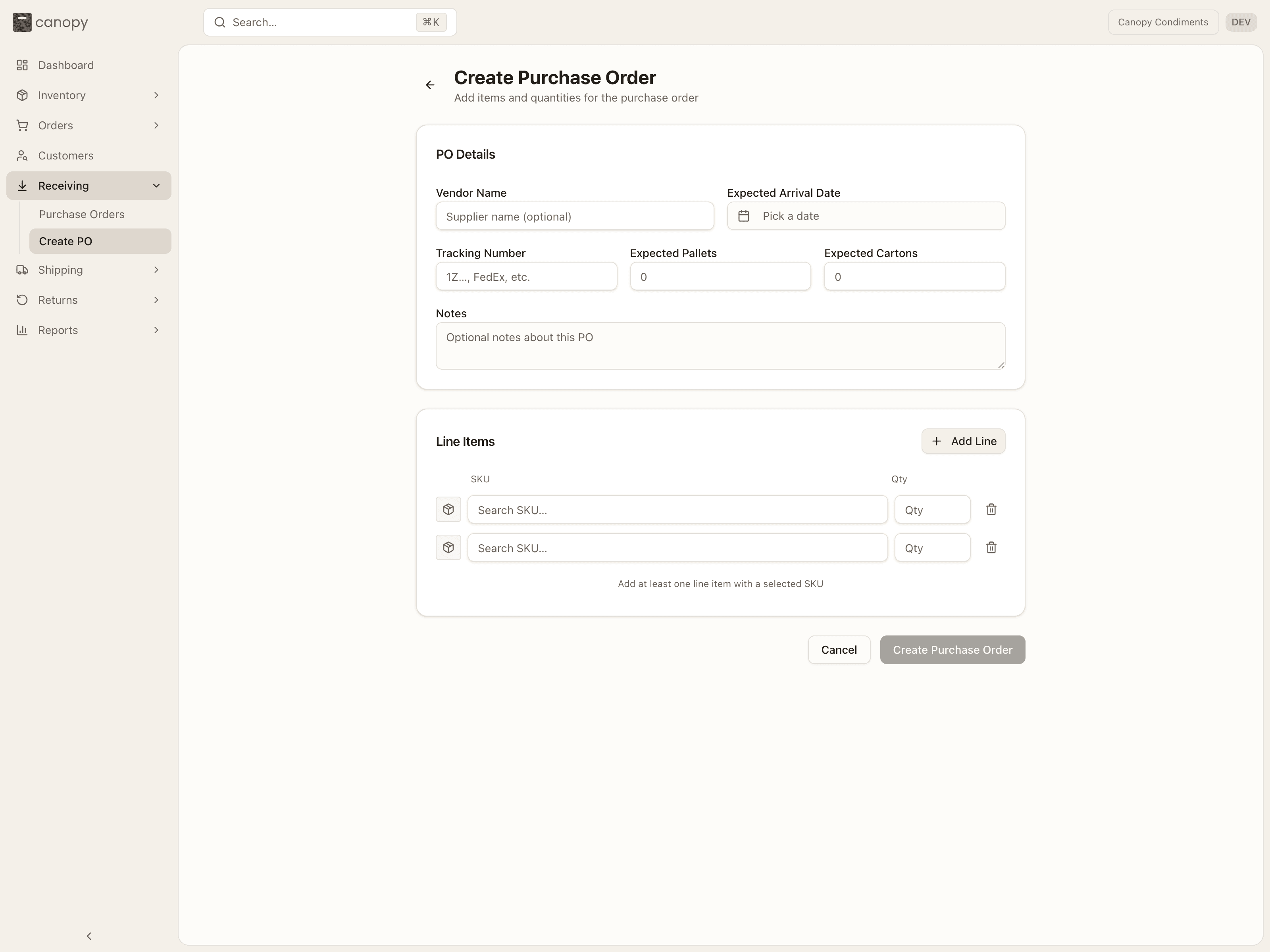
PO Details
- Vendor Name — optional; the supplier the stock is coming from.
- Expected Arrival Date — pick a date from the calendar. A PO due today shows up under Today's Arrivals.
- Tracking Number — the inbound carrier tracking, if you have it.
- Expected Pallets and Expected Cartons — how the shipment is packed. The warehouse confirms the counts they actually receive against these.
- Notes — anything the receiving team should know.
- Warehouse — only shown when your 3PL runs more than one warehouse and nothing else says which one this PO is bound for: the top bar is on All warehouses, which is where a brand login starts. It starts on Client's default warehouse, which files the PO at the warehouse your 3PL set as your brand's default; pick a warehouse instead if the stock is going somewhere else. If your 3PL hasn't set a default, Create Purchase Order is refused with "Multiple warehouses are active — specify warehouseId on the shipment, set your session warehouse, or set the client's default warehouse." Pick the warehouse, or ask your 3PL to set your default.
Line Items
Add Line adds a row. Each row has a SKU box — "Search SKU…" looks up your catalog (it searches only; it can't create a SKU) — a Qty, and a remove button (disabled while there's only one row).
If your 3PL has opted your brand in to sell-ahead, each row also has a Sell ahead box: how many units of that line you'll sell before the stock lands. It can't exceed the line's quantity.
The form tells you what's missing before it lets you submit: "Enter a quantity for every SKU line" when a picked SKU has no quantity, "Sell ahead can't exceed the line's quantity", or "Add at least one line item with a selected SKU".
Duplicate a PO
Reordering the same assortment? Open an existing PO and Duplicate it to pre-fill a new one — vendor, tracking, arrival date, pallet and carton counts, notes, and lines — under the title Duplicate Purchase Order.
Many POs at once
Import CSV on the Purchase Orders page creates a batch of POs from one file — one row per line, rows sharing a PO Number becoming one PO — with the same fields as this form. See Importing purchase orders from a CSV.
How to create a PO
Set the vendor, the expected arrival, and optionally tracking, pallet and carton counts, and a note. If the form shows Warehouse, leave it on Client's default warehouse or pick where the stock is going.
Add lines — search each SKU and enter its expected quantity (and Sell ahead, if you have it).
Press Create Purchase Order. The PO opens as Pending, ready for the warehouse to receive against, and you can keep editing it until receiving is complete.