

Backorders
Which of your SKUs are short, the orders each shortage is holding up, and what's already on its way in.
The Backorders report shows every SKU with unmet demand — orders you've sent that can't be allocated because the stock isn't there — one row per SKU and warehouse. A SKU at zero with no orders waiting on it isn't listed; a SKU with units on the shelf that are all already promised to other orders is. Orders you've put on hold are left out, since they're waiting on a decision rather than on stock.
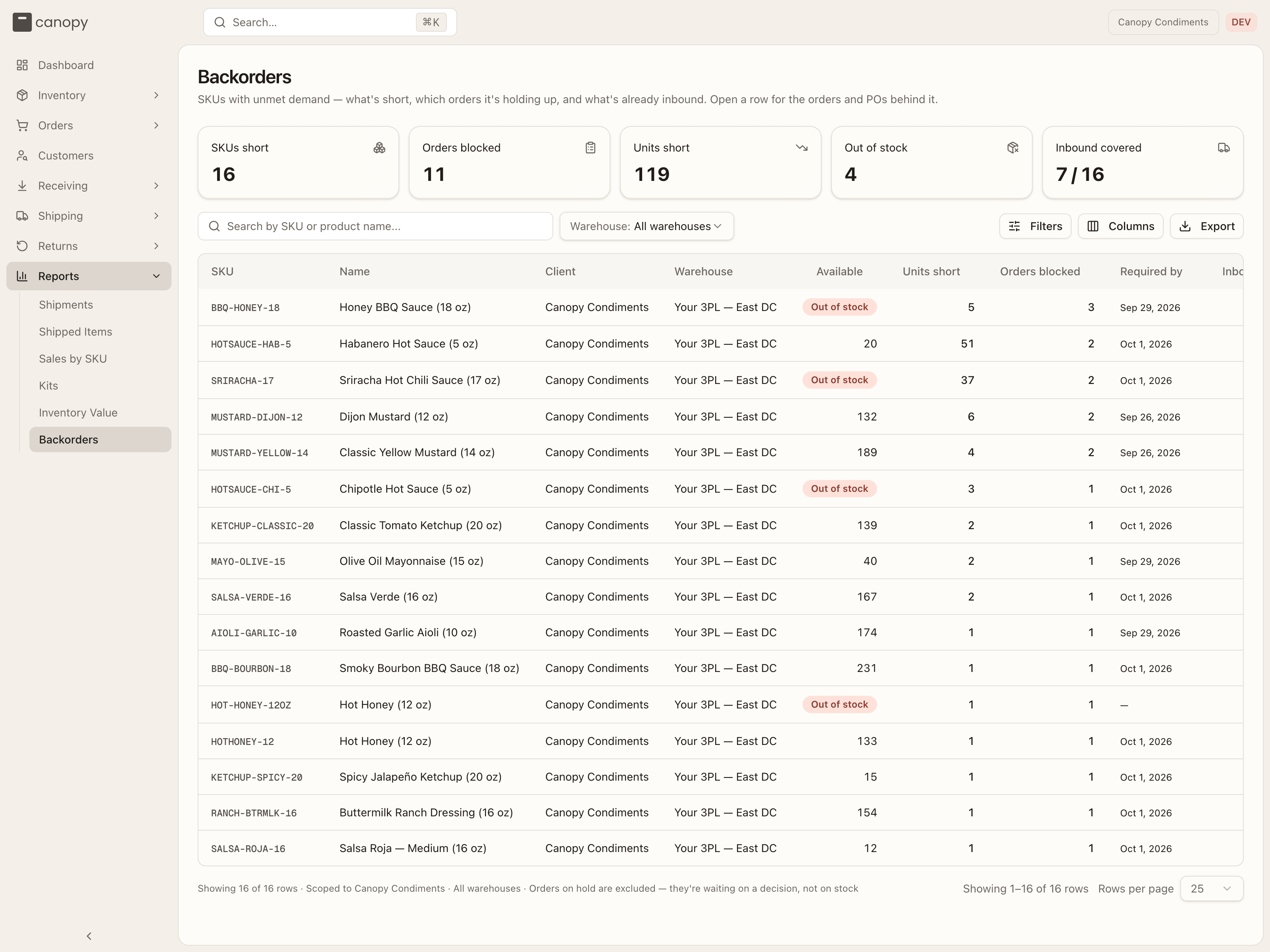
The headline tiles
Five tiles sit above the table and follow whatever filters you set:
- SKUs short — how many SKUs have at least one order waiting.
- Orders blocked — how many orders can't ship because of them.
- Units short — the total units those orders are still owed.
- Out of stock — the short SKUs with nothing left to promise at all.
- Inbound covered — how many of the short SKUs have an open purchase order bringing some in, shown as n / SKUs short.
Filtering
Search by SKU or product name. The Warehouse select narrows to one warehouse (it defaults to all of them and doesn't follow the warehouse switcher in the top bar). The Filters popover adds two checkboxes:
- Out of stock only — keeps just the SKUs with nothing left to promise. Stock that's on hand but already allocated counts as none, and so does stock the warehouse can't ship — quarantined units, or lots that are expired, held, or too close to expiry.
- Not covered by a PO — hides rows an open purchase order already covers in full under sell ahead, leaving the shortfall that still needs a buying decision. If your brand doesn't sell ahead, this changes nothing.
Active filters appear as chips; Clear all resets them.
Reading a row
The default columns are:
| Column | What it shows |
|---|---|
| SKU / Name | The product. The SKU is a link into its detail. |
| Client | Your brand's name (the 3PL sees every brand here; you see only yours). |
| Warehouse | Where the orders are waiting. |
| Available | Units the warehouse can still promise. At zero it shows an Out of stock badge — with "N on hand unsellable" beneath it when units exist but can't be shipped. |
| Units short | How many units the waiting orders are owed beyond what's available. |
| Orders blocked | How many orders are waiting on this SKU here. |
| Required by | The earliest required ship date among those orders. |
| Inbound | Units still outstanding on open purchase orders. Green when it clears the shortfall; plain when it only covers part; "—" when nothing is coming. |
| Inbound ETA | The earliest expected arrival — "No ETA" if the PO has none, "Nothing on the way" if there's no PO. |
The Columns popover adds On hand, Allocated, Unsellable (on-hand units the warehouse can't ship), Waiting since (the oldest blocked order's date), and Covered by PO. Any column can be hidden; Reset restores the defaults. Rows sort worst-first — most orders blocked, then most units short — until you click a column header.
Sell ahead
Covered by PO only applies if your 3PL has switched Sell ahead on for your brand — the option to advertise units on an open PO to your sales channels before they arrive. When it's on, the column counts how many of the short units were sold against an open PO on purpose; a green number means all of them were, so the customer was told it ships when the PO lands. When it's off, the column shows "—" and the detail sheet says "This client doesn't sell ahead".
The detail sheet
Click a row to see what's behind it. The header repeats the SKU, name, and warehouse; four figures give Units short, Available, Inbound (units · ETA), and Covered by PO. Two tables follow:
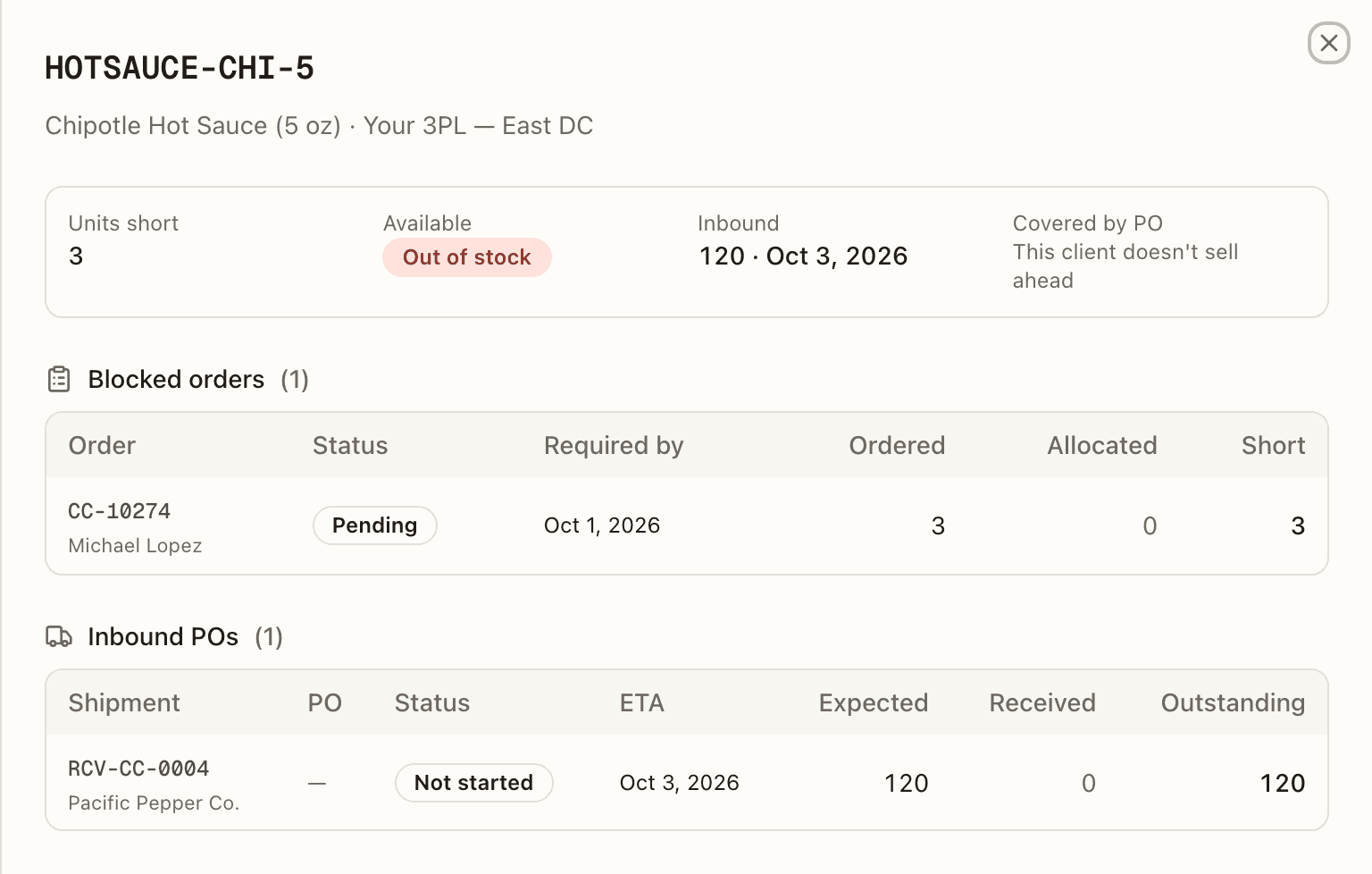
- Blocked orders — each waiting order (the number is a link that opens it, with the customer's name beneath), its Status, Required by date, and how many units were Ordered, Allocated so far, and still Short.
- Inbound POs — each open purchase order for the SKU: the Shipment number (a link to the PO, vendor beneath), your PO number, its Status (Not started or Receiving), ETA, and the Expected, Received, and Outstanding quantities — with "N sold ahead" under Outstanding when part of that PO is already promised. With no PO open it reads "Nothing on the way. Raise a PO to clear these orders."
Exporting
Export downloads everything that matches your filters — every column, not just the ones on screen — and adds one row per blocked order and one per open PO beneath each SKU, with a Row type column to tell them apart. That makes the file the thing you actually work from when chasing orders or raising POs. The toast confirms how many blocked-order and PO rows it wrote; a very large export is capped, and the toast tells you to narrow the filters for the rest.
The page footer shows the row count and the scope you've chosen, and reminds you that orders on hold are excluded.